 BARREL
Documentação DIY
Crie seus próprios dispositivos inteligentes com ESP32 e integre-os ao Barrel Smart Home. Exemplos completos de código para você começar agora mesmo.
Controle dispositivos elétricos remotamente via WiFi
Aplicações
- Controle de lâmpadas e luminárias
- Acionamento de ventiladores e ar-condicionado
- Automação de eletrodomésticos
- Controle de aquecedores e cafeteiras
Componentes Necessários
- ESP32-WROOM-32D ou semelhante
- Módulo Relé 5V (1 canal)
- Fonte de alimentação 5V 2A
- Sensor Touch Capacitivo TTP223
- Conector de tomada AC
- Soquete de tomada AC
Diagrama de Circuito
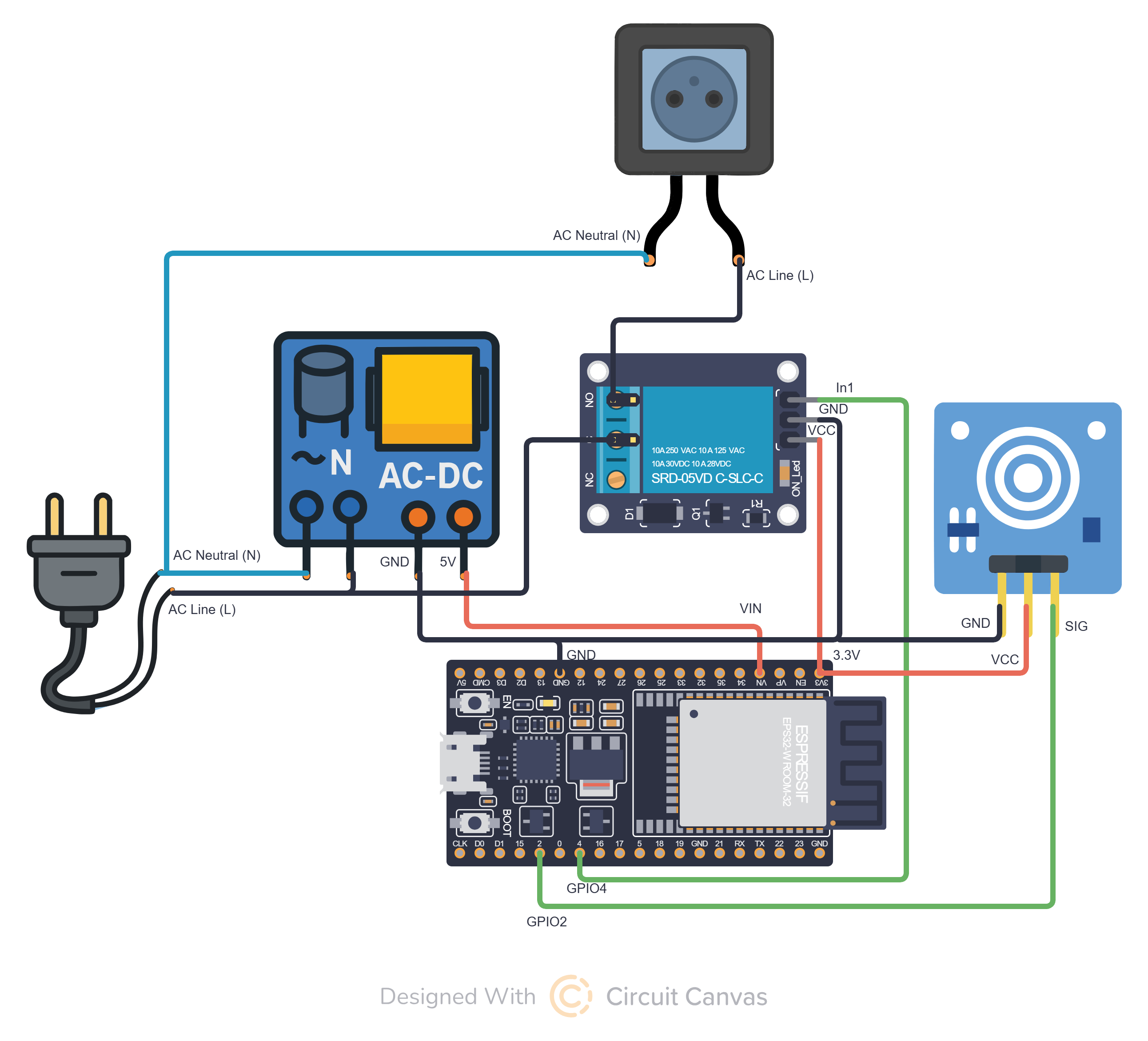
- Conecte o pino GPIO4 do ESP32 ao pino IN1 do módulo relé.
- Alimente o módulo relé com 5V (VCC) e GND vindos da fonte AC-DC.
- Conecte a entrada da fonte AC-DC nos fios de corrente alternada: fase (L) e neutro (N).
- Use a saída 5V da fonte AC-DC para alimentar o ESP32 pelo pino VIN e conecte o GND em comum.
- No relé, ligue a fase (L) da rede elétrica na entrada COM e a saída NO na fase da tomada.
- Conecte o neutro (N) da tomada diretamente ao neutro da rede elétrica.
- Conecte o sensor touch aos pinos GND, VCC (3.3V) e SIG do ESP32.
- O pino SIG do sensor touch deve ser ligado ao GPIO2 do ESP32.
- Garanta que todos os módulos compartilhem o mesmo GND.
- Após as conexões, o ESP32 poderá controlar o relé via aplicativo ou pelo toque no sensor.
Código Completo
1#include <WebServer.h>
2#include <WiFi.h>
3#include <WiFiClient.h>
4#include <Preferences.h>
5#include <ESPmDNS.h>
6#include <NimBLEDevice.h>
7#include <ArduinoJson.h>
8#include <AESLib.h>
9#include <base64.h>
10#include <PubSubClient.h>
11#include <esp_system.h>
12
13// ==================== CONFIGURAÇÕES ====================
14
15// UUIDs BLE
16#define SERVICE_UUID        "12345678-1234-5678-1234-56789abcdef0"
17#define CHARACTERISTIC_UUID "abcdef01-1234-5678-1234-56789abcdef0"
18#define DEVICE_ID_CHAR_UUID "abcdef02-1234-5678-1234-56789abcdef0"
19
20// Identificação do dispositivo
21#define TYPE "BARREL_SWITCH"
22
23// Pinos
24#define PLUG_PIN 4
25#define TOUCH_PIN 2
26
27// MQTT
28const char* mqtt_server = "barrel.app.br";
29const int mqtt_port = 1883;
30
31// Criptografia AES
32String aesKeyString = "<AES_KEY>";
33String aesIVString = "<AES_IV>";
34
35// ==================== VARIÁVEIS GLOBAIS ====================
36
37WiFiClient espClient;
38PubSubClient mqttClient(espClient);
39Preferences preferences;
40WebServer server(8080);
41
42NimBLECharacteristic *pCharacteristic;
43NimBLECharacteristic *pDeviceIdChar;
44
45String receivedData = "";
46bool bleEnabled = false;
47bool isOn = false;
48
49// Controle do sensor touch
50unsigned long lastTouchTime = 0;
51bool lastTouchState = HIGH;
52
53// ==================== FUNÇÕES DE ID DO DISPOSITIVO ====================
54
55String toHex(uint64_t v, uint8_t bytes) {
56  char buf[17] = {0};
57  for (int i = bytes - 1; i >= 0; --i) {
58    uint8_t b = (v >> (i * 8)) & 0xFF;
59    sprintf(buf + (bytes - 1 - i) * 2, "%02X", b);
60  }
61  return String(buf);
62}
63
64String getDeviceIdFull() {
65  uint64_t mac = ESP.getEfuseMac();
66  return toHex(mac, 6);
67}
68
69String getDeviceIdShort() {
70  uint64_t mac = ESP.getEfuseMac();
71  String prefix = toHex(mac >> 32, 2);
72  String suffix = toHex(mac, 2);
73  return prefix + suffix;
74}
75
76// ==================== FUNÇÕES DE CRIPTOGRAFIA ====================
77
78void stringToBytes(String hexString, byte* byteArray) {
79  for (int i = 0; i < hexString.length(); i += 2) {
80    String byteString = hexString.substring(i, i + 2);
81    byteArray[i / 2] = strtol(byteString.c_str(), NULL, 16);
82  }
83}
84
85String decryptMessage(String encryptedMessage) {
86  byte decrypted[128];
87  byte encrypted[128];
88  byte aesKey[16];
89  byte aesIV[16];
90
91  stringToBytes(aesKeyString, aesKey);
92  stringToBytes(aesIVString, aesIV);
93
94  int encryptedLen = base64_dec_len(encryptedMessage.c_str(), encryptedMessage.length());
95  int actualEncryptedLen = base64_decode((char*)encrypted, encryptedMessage.c_str(), encryptedMessage.length());
96
97  AES aes;
98  int decryptedLen = aes.do_aes_decrypt(encrypted, actualEncryptedLen, decrypted, aesKey, 128, aesIV);
99
100  // Remove padding PKCS7
101  if (decryptedLen > 0) {
102    uint8_t padLength = decrypted[decryptedLen - 1];
103    if (padLength > 0 && padLength <= 16) {
104      decryptedLen -= padLength;
105    }
106  }
107
108  String decryptedMessage = "";
109  for (int i = 0; i < decryptedLen; i++) {
110    decryptedMessage += (char)decrypted[i];
111  }
112
113  return decryptedMessage;
114}
115
116// ==================== CONTROLE DO RELÉ ====================
117
118void setPin(bool state) {
119  digitalWrite(PLUG_PIN, state ? HIGH : LOW);
120  isOn = state;
121  publishDeviceState();
122}
123
124// ==================== FUNÇÕES MQTT ====================
125
126void publishDeviceState() {
127  if (WiFi.status() == WL_CONNECTED && mqttClient.connected()) {
128    String ip = WiFi.localIP().toString();
129    String state = isOn ? "on" : "off";
130
131    preferences.begin("wifi-config", false);
132    String mqtt_user = preferences.getString("mqtt_user", "");
133    preferences.end();
134
135    String shortId = getDeviceIdShort();
136    String topic = "users/" + mqtt_user + "/" + String(TYPE) + "_" + shortId + "/status";
137    String payload = state + "," + ip;
138
139    if (mqttClient.publish(topic.c_str(), payload.c_str())) {
140      Serial.println("Estado publicado no MQTT(" + topic + "): " + payload);
141    } else {
142      Serial.println("Falha ao publicar estado no MQTT.");
143    }
144  }
145}
146
147void mqttCallback(char* topic, byte* payload, unsigned int length) {
148  Serial.print("Mensagem recebida [");
149  Serial.print(topic);
150  Serial.print("]: ");
151
152  String cmd;
153  for (unsigned int i = 0; i < length; i++) {
154    cmd += (char)payload[i];
155  }
156  Serial.println(cmd);
157
158  // Processa comandos MQTT
159  handleCommand(cmd);
160}
161
162void connectToMQTT() {
163  mqttClient.setServer(mqtt_server, mqtt_port);
164  mqttClient.setCallback(mqttCallback);
165
166  String clientId = "ESP32Client-" + String(WiFi.macAddress());
167
168  preferences.begin("wifi-config", false);
169  String mqtt_user = preferences.getString("mqtt_user", "");
170  String mqtt_password = preferences.getString("mqtt_pass", "");
171  String shortId = getDeviceIdShort();
172  String mqtt_topic = "users/" + mqtt_user + "/" + String(TYPE) + "_" + shortId + "/command";
173  preferences.end();
174
175  if (mqttClient.connect(clientId.c_str(), mqtt_user.c_str(), mqtt_password.c_str())) {
176    Serial.println("Conectado ao broker MQTT!");
177    mqttClient.subscribe(mqtt_topic.c_str());
178  } else {
179    Serial.println("Falha na conexão MQTT. Código: " + String(mqttClient.state()));
180  }
181}
182
183void reconnectMQTT() {
184  while (!mqttClient.connected()) {
185    String clientId = "ESP32Client-" + String(WiFi.macAddress());
186    Serial.println("Reconectando ao MQTT...");
187
188    preferences.begin("wifi-config", false);
189    String mqtt_user = preferences.getString("mqtt_user", "");
190    String mqtt_password = preferences.getString("mqtt_pass", "");
191    String shortId = getDeviceIdShort();
192    String mqtt_topic = "users/" + mqtt_user + "/" + String(TYPE) + "_" + shortId + "/command";
193    preferences.end();
194
195    if (mqttClient.connect(clientId.c_str(), mqtt_user.c_str(), mqtt_password.c_str())) {
196      mqttClient.subscribe(mqtt_topic.c_str());
197    } else {
198      delay(5000);
199    }
200  }
201}
202
203// ==================== BLUETOOTH (BLE) ====================
204
205class MyCallbacks : public NimBLECharacteristicCallbacks {
206  void onWrite(NimBLECharacteristic* pCharacteristic) override {
207    std::string value = pCharacteristic->getValue();
208    if (value.length() > 0) {
209      receivedData = String(value.c_str());
210      Serial.println("Received via BLE: " + receivedData);
211
212      // Parse credenciais (formato: SSID,PASSWORD,USERMQTT,PASSMQTT)
213      int firstComma = receivedData.indexOf(",");
214      int secondComma = receivedData.indexOf(",", firstComma + 1);
215      int thirdComma = receivedData.indexOf(",", secondComma + 1);
216
217      if (firstComma > 0) {
218        preferences.begin("wifi-config", false);
219        String ssid = receivedData.substring(0, firstComma);
220        String password = receivedData.substring(firstComma + 1, secondComma);
221        String mqttUser = receivedData.substring(secondComma + 1, thirdComma);
222        String mqttPass = receivedData.substring(thirdComma + 1);
223
224        preferences.putString("mqtt_user", mqttUser);
225        preferences.putString("mqtt_pass", mqttPass);
226
227        Serial.println("Connecting to WiFi...");
228        WiFi.begin(ssid.c_str(), password.c_str());
229
230        int tries = 0;
231        while (WiFi.status() != WL_CONNECTED && tries < 10) {
232          delay(1000);
233          Serial.print(".");
234          tries++;
235        }
236
237        if (WiFi.status() == WL_CONNECTED) {
238          Serial.println("
239Connected to WiFi!");
240          preferences.putString("ssid", ssid);
241          preferences.putString("password", password);
242          pCharacteristic->setValue("Connected");
243        } else {
244          Serial.println("
245Failed to connect.");
246          pCharacteristic->setValue("Failed");
247          preferences.clear();
248        }
249
250        preferences.end();
251        delay(3000);
252        ESP.restart();
253      }
254    }
255  }
256};
257
258void enableBLE() {
259  if (!bleEnabled) {
260    Serial.println("Enabling BLE...");
261
262    String shortId = getDeviceIdShort();
263    String fullId = getDeviceIdFull();
264    String bleName = String(TYPE) + "_" + shortId;
265
266    NimBLEDevice::init(bleName.c_str());
267
268    NimBLEServer* pServer = NimBLEDevice::createServer();
269    NimBLEService* pService = pServer->createService(SERVICE_UUID);
270
271    pCharacteristic = pService->createCharacteristic(
272      CHARACTERISTIC_UUID,
273      NIMBLE_PROPERTY::READ | NIMBLE_PROPERTY::WRITE | NIMBLE_PROPERTY::READ_ENC | NIMBLE_PROPERTY::WRITE_ENC
274    );
275    pCharacteristic->setCallbacks(new MyCallbacks());
276
277    pDeviceIdChar = pService->createCharacteristic(
278      DEVICE_ID_CHAR_UUID,
279      NIMBLE_PROPERTY::READ
280    );
281    pDeviceIdChar->setValue(fullId.c_str());
282
283    pService->start();
284
285    NimBLEAdvertising* pAdvertising = NimBLEDevice::getAdvertising();
286    pAdvertising->addServiceUUID(SERVICE_UUID);
287    pAdvertising->setScanResponse(true);
288
289    std::string mdata = "AID:" + std::string(fullId.c_str());
290    pAdvertising->setManufacturerData(mdata);
291    pAdvertising->start();
292
293    NimBLEDevice::startAdvertising();
294    bleEnabled = true;
295  }
296}
297
298void disableBLE() {
299  if (bleEnabled) {
300    Serial.println("Disabling BLE...");
301    NimBLEDevice::deinit(true);
302    bleEnabled = false;
303  }
304}
305
306// ==================== COMANDOS ========================
307void handleCommand(String cmd) {
308    if (cmd.equalsIgnoreCase("on")) {
309      setPin(true);
310    }
311    else if (cmd.equalsIgnoreCase("off")) {
312      setPin(false);
313    }
314    else if (cmd.equalsIgnoreCase("toggle")) {
315      setPin(!isOn);
316    }
317    else if (cmd.equalsIgnoreCase("status")) {
318      publishDeviceState();
319    }
320    else if (cmd.equalsIgnoreCase("clear")) {
321      preferences.begin("wifi-config", false);
322      preferences.clear();
323      preferences.end();
324      server.send(200, "text/plain", "OK");
325      Serial.println("Reiniciando...");
326      delay(500);
327      ESP.restart();
328    }
329}
330
331// ==================== SERVIDOR WEB ====================
332
333void handleState() {
334  if (server.hasArg("plain")) {
335    String encryptedBody = server.arg("plain");
336    String cmd = decryptMessage(encryptedBody);
337    Serial.println("Corpo descriptografado: " + cmd);
338
339    // Processa comandos HTTP
340    handleCommand(cmd);
341
342    server.send(200, "application/json", "{"message": "Comando recebido com sucesso!"}");
343  } else {
344    server.send(400, "application/json", "{"message": "Erro: Nenhum comando enviado!"}");
345  }
346}
347
348// ==================== SETUP ====================
349
350void setup() {
351  Serial.begin(115200);
352
353  String shortId = getDeviceIdShort();
354  String deviceId = String(TYPE) + "_" + shortId;
355  Serial.print("Iniciando " + deviceId);
356
357  pinMode(PLUG_PIN, OUTPUT);
358  pinMode(TOUCH_PIN, INPUT_PULLUP);
359
360  preferences.begin("wifi-config", false);
361  String ssid = preferences.getString("ssid", "");
362  String password = preferences.getString("password", "");
363  preferences.end();
364
365  // Se tem credenciais salvas, conecta ao WiFi
366  if (ssid.length() > 0) {
367    WiFi.begin(ssid.c_str(), password.c_str());
368
369    Serial.print("Conectando ao Wi-Fi");
370    int attempts = 0;
371    while (WiFi.status() != WL_CONNECTED && attempts < 20) {
372      delay(1000);
373      Serial.print(".");
374      attempts++;
375    }
376
377    if (WiFi.status() == WL_CONNECTED) {
378      Serial.println("
379Wi-Fi Conectado!");
380      Serial.print("IP: ");
381      Serial.println(WiFi.localIP());
382
383      // Iniciar mDNS
384      if (!MDNS.begin(deviceId)) {
385        Serial.println("Erro ao iniciar mDNS");
386      } else {
387        Serial.println("mDNS iniciado: barrel.local");
388      }
389
390      disableBLE();
391
392      // Rotas do servidor web
393      server.on("/get_key_iv", HTTP_GET, []() {
394        String response = aesKeyString + ":" + aesIVString;
395        server.send(200, "text/plain", response);
396      });
397
398      server.on("/clear", HTTP_GET, []() {
399        preferences.begin("wifi-config", false);
400        preferences.clear();
401        preferences.end();
402        server.send(200, "text/plain", "OK");
403        Serial.println("Reiniciando...");
404        delay(500);
405        ESP.restart();
406      });
407
408      server.on("/command", HTTP_POST, handleState);
409
410      server.begin();
411      connectToMQTT();
412    }
413  }
414  else {
415    // Sem credenciais, ativa BLE para configuração
416    enableBLE();
417  }
418}
419
420// ==================== LOOP ====================
421
422void loop() {
423  server.handleClient();
424
425  if (!bleEnabled) {
426    if (!mqttClient.connected()) {
427      reconnectMQTT();
428    }
429    mqttClient.loop();
430  }
431
432  // Monitorar sensor touch com debounce
433  bool touchState = digitalRead(TOUCH_PIN);
434
435  if (lastTouchState == HIGH && touchState == LOW) {
436    unsigned long now = millis();
437    if (now - lastTouchTime > 500) {
438      isOn = !isOn;
439      setPin(isOn);
440      Serial.println("Touch detectado -> novo estado: " + String(isOn ? "ON" : "OFF"));
441      lastTouchTime = now;
442    }
443  }
444
445  lastTouchState = touchState;
446}Controle dispositivos via infravermelho (IR) com mudança de cores
Aplicações
- Controle de fitas LED RGB
- Acionamento de TVs e aparelhos de som
- Controle de ar-condicionado via IR
- Automação de ventiladores com controle remoto
Componentes Necessários
- ESP32-C3 Mini ou semelhante
- Controle Remoto RF 433MHz
Diagrama de Circuito
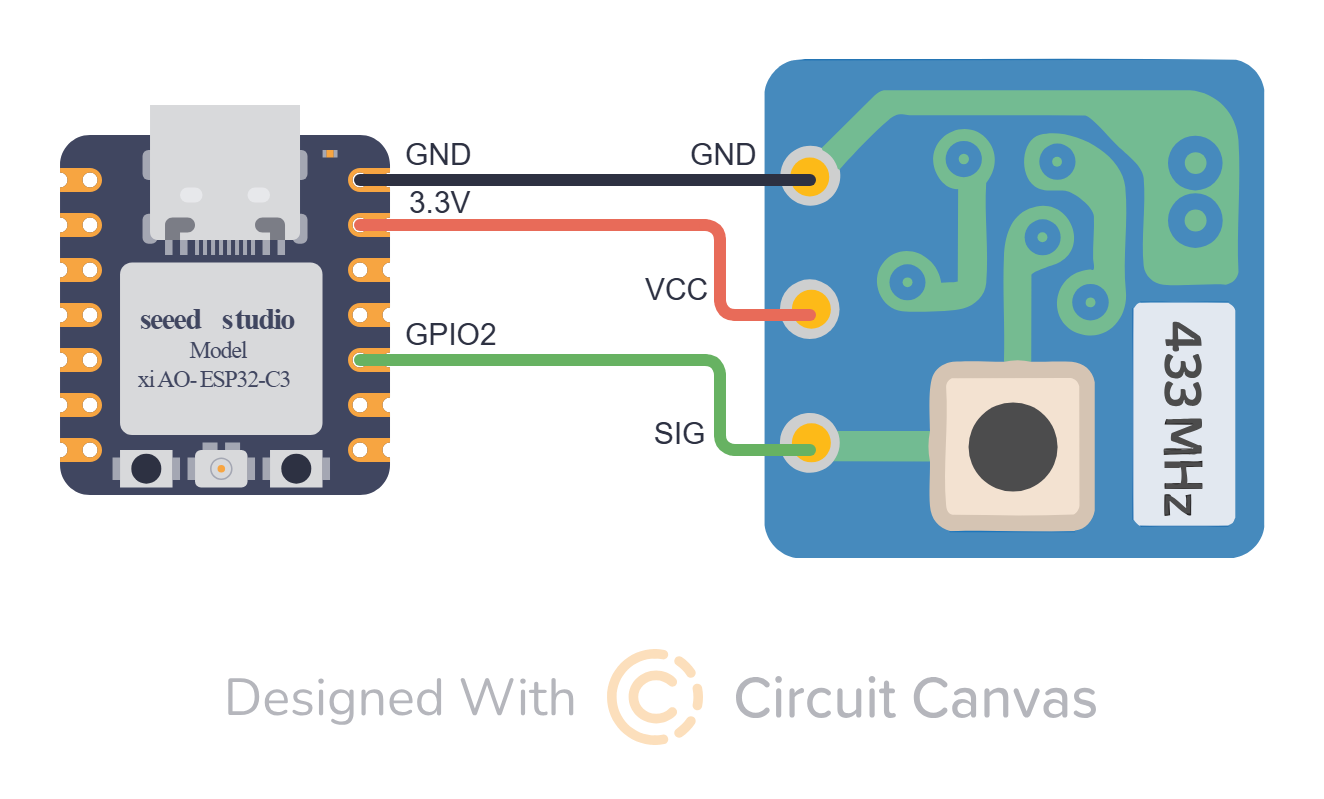
Conecte o LED IR ao coletor do transistor 2N2222. Base no GPIO 13 via resistor 220Ω. Emissor ao GND.
Código Completo
1#include <WebServer.h>
2#include <WiFi.h>
3#include <WiFiClient.h>
4#include <Preferences.h>
5#include <ESPmDNS.h>
6#include <NimBLEDevice.h>
7#include <ArduinoJson.h>
8#include <AESLib.h>
9#include <base64.h>
10#include <PubSubClient.h>
11#include <esp_system.h>
12
13// ==================== CONFIGURAÇÕES ====================
14
15// UUIDs BLE
16#define SERVICE_UUID        "12345678-1234-5678-1234-56789abcdef0"
17#define CHARACTERISTIC_UUID "abcdef01-1234-5678-1234-56789abcdef0"
18#define DEVICE_ID_CHAR_UUID "abcdef02-1234-5678-1234-56789abcdef0"
19
20// Identificação do dispositivo
21#define TYPE "BARREL_RF"
22
23// Pinos
24#define PIN_ONE 2
25
26// Variável de estado do relé
27bool stateMemo = false;
28
29// Configurações MQTT
30const char* mqtt_server = "barrel.app.br";
31const int mqtt_port = 1883;
32
33// ==================== VARIÁVEIS GLOBAIS ====================
34
35WiFiClient espClient;
36PubSubClient mqttClient(espClient);
37
38NimBLECharacteristic *pCharacteristic;
39NimBLECharacteristic *pDeviceIdChar;
40
41String receivedData = "";
42bool bleEnabled = false;
43bool mqttEnabled = false;
44
45// Chaves de criptografia AES
46String aesKeyString = "<AES_KEY>";
47String aesIVString = "<AES_IV>";
48
49Preferences preferences;
50WebServer server(8080);
51
52// ==================== FUNÇÕES DE ID DO DISPOSITIVO ====================
53
54// Converte valor para string hexadecimal
55String toHex(uint64_t v, uint8_t bytes) {
56  char buf[17] = {0};
57  for (int i = bytes - 1; i >= 0; --i) {
58    uint8_t b = (v >> (i * 8)) & 0xFF;
59    sprintf(buf + (bytes - 1 - i) * 2, "%02X", b);
60  }
61  return String(buf);
62}
63
64// Obtém o ID completo do dispositivo (MAC address)
65String getDeviceIdFull() {
66  uint64_t mac = ESP.getEfuseMac();
67  return toHex(mac, 6);
68}
69
70// Obtém o ID curto do dispositivo
71String getDeviceIdShort() {
72  uint64_t mac = ESP.getEfuseMac();
73  return toHex(mac, 3);
74}
75
76// ==================== FUNÇÕES MQTT ====================
77
78// Conecta ao broker MQTT
79void connectToMQTT() {
80  preferences.begin("wifi-config", false);
81  String mqtt_user = preferences.getString("mqtt_user", "");
82  String mqtt_password = preferences.getString("mqtt_pass", "");
83  preferences.end();
84
85  // Valida se tem credenciais MQTT
86  if (mqtt_user.length() == 0 || mqtt_password.length() == 0) {
87    Serial.println("Credenciais MQTT não configuradas. MQTT desabilitado.");
88    mqttEnabled = false;
89    return false;
90  }
91
92  mqttClient.setServer(mqtt_server, mqtt_port);
93  mqttClient.setCallback(mqttCallback);
94
95  String clientId = "ESP32Client-" + String(WiFi.macAddress());
96
97  String shortId = getDeviceIdShort();
98  String mqtt_topic = "users/" + mqtt_user + "/" + String(TYPE) + "_" + shortId + "/command";
99
100  // Tenta conexão MQTT
101  if (mqttClient.connect(clientId.c_str(), mqtt_user.c_str(), mqtt_password.c_str())) {
102    Serial.println("Conectado ao broker MQTT!");
103    mqttClient.subscribe(mqtt_topic.c_str());
104    mqttEnabled = true;
105  } else {
106    Serial.println("Falha na conexão MQTT. Código: " + String(mqttClient.state()));
107    mqttEnabled = false;
108  }
109}
110
111// Reconecta ao MQTT em caso de desconexão
112void reconnectMQTT() {
113  if (!mqttEnabled) {
114    return;
115  }
116
117  preferences.begin("wifi-config", false);
118  String mqtt_user = preferences.getString("mqtt_user", "");
119  String mqtt_password = preferences.getString("mqtt_pass", "");
120  preferences.end();
121
122  // Valida credenciais novamente
123  if (mqtt_user.length() == 0 || mqtt_password.length() == 0) {
124    Serial.println("Credenciais MQTT ausentes. Desabilitando MQTT.");
125    mqttEnabled = false;
126    return;
127  }
128
129
130  while (!mqttClient.connected()) {
131    String clientId = "ESP32Client-" + String(WiFi.macAddress());
132    Serial.println("Reconectando ao MQTT...");
133
134    String shortId = getDeviceIdShort();
135    String mqtt_topic = "users/" + mqtt_user + "/" + String(TYPE) + "_" + shortId + "/command";
136
137    if (mqttClient.connect(clientId.c_str(), mqtt_user.c_str(), mqtt_password.c_str())) {
138      mqttClient.subscribe(mqtt_topic.c_str());
139    } else {
140      delay(5000);
141    }
142  }
143}
144
145// Callback para mensagens MQTT recebidas
146void mqttCallback(char* topic, byte* payload, unsigned int length) {
147  Serial.print("Mensagem recebida [");
148  Serial.print(topic);
149  Serial.print("]: ");
150
151  // Converte payload para String
152  String cmd;
153  for (unsigned int i = 0; i < length; i++) {
154    cmd += (char)payload[i];
155  }
156
157  // Processa o comando recebido
158  handleCommand(cmd);
159}
160
161// Publica o estado do dispositivo no MQTT
162void publishDeviceState() {
163  if (!mqttEnabled || !mqttClient.connected()) {
164    return;
165  }
166
167  if (WiFi.status() == WL_CONNECTED && mqttClient.connected()) {
168    String ip = WiFi.localIP().toString();
169    String state = stateMemo ? "on" : "off";
170
171    preferences.begin("wifi-config", false);
172    String mqtt_user = preferences.getString("mqtt_user", "");
173    preferences.end();
174
175    String shortId = getDeviceIdShort();
176    String topic = "users/" + mqtt_user + "/" + String(TYPE) + "_" + shortId + "/status";
177
178    String payload = state + "," + ip;
179
180    if (mqttClient.publish(topic.c_str(), payload.c_str())) {
181      Serial.println("Estado publicado no MQTT("+ topic +"): " + payload);
182    } else {
183      Serial.println("Falha ao publicar estado no MQTT.");
184    }
185  } else {
186    Serial.println("Não conectado ao Wi-Fi ou MQTT. Não foi possível publicar estado.");
187  }
188}
189
190// ==================== BLUETOOTH (BLE) ====================
191
192// Callbacks para características BLE
193class MyCallbacks : public NimBLECharacteristicCallbacks {
194    void onWrite(NimBLECharacteristic* pCharacteristic) override {
195        std::string value = pCharacteristic->getValue();
196        if (value.length() > 0) {
197            receivedData = String(value.c_str());
198            Serial.println("Received via BLE: " + receivedData);
199
200            // Separar credenciais (supondo formato "SSID,PASSWORD,USERMQTT,PASSMQTT")
201            int firstComma  = receivedData.indexOf(",");
202            int secondComma = receivedData.indexOf(",", firstComma + 1);
203            int thirdComma  = receivedData.indexOf(",", secondComma + 1);
204            if (firstComma > 0) {
205                preferences.begin("wifi-config", false);
206                String ssid      = receivedData.substring(0, firstComma);
207                String password  = receivedData.substring(firstComma + 1, secondComma);
208
209                // MQTT é opcional
210                String mqttUser = "";
211                String mqttPass = "";
212
213                if (secondComma > 0 && thirdComma > secondComma) {
214                  mqttUser = receivedData.substring(secondComma + 1, thirdComma);
215                  mqttPass = receivedData.substring(thirdComma + 1);
216
217                  if (mqttUser.length() > 0 && mqttPass.length() > 0) {
218                    preferences.putString("mqtt_user", mqttUser);
219                    preferences.putString("mqtt_pass", mqttPass);
220                    Serial.println("Credenciais MQTT salvas.");
221                  }
222                }
223
224                preferences.putString("mqtt_user", mqttUser);
225                preferences.putString("mqtt_pass", mqttPass);
226
227                Serial.println("Connecting to WiFi...");
228                WiFi.begin(ssid.c_str(), password.c_str());
229
230                int tries = 0;
231                while (WiFi.status() != WL_CONNECTED && tries < 10) {
232                    delay(1000);
233                    Serial.print(".");
234                    tries++;
235                }
236
237                if (WiFi.status() == WL_CONNECTED) {
238                    Serial.println("
239Connected to WiFi!");
240                    preferences.putString("ssid", ssid);
241                    preferences.putString("password", password);
242                    preferences.end();
243                    pCharacteristic->setValue("Connected");
244                } else {
245                    Serial.println("
246Failed to connect.");
247                    pCharacteristic->setValue("Failed");
248                    preferences.clear();
249                }
250                delay(3000);
251                ESP.restart();
252            }
253        }
254    }
255};
256
257// ==================== FUNÇÕES DE CRIPTOGRAFIA ====================
258
259// Converte string hexadecimal para array de bytes
260void stringToBytes(String hexString, byte* byteArray) {
261  for (int i = 0; i < hexString.length(); i += 2) {
262      String byteString = hexString.substring(i, i + 2);
263      byteArray[i / 2] = strtol(byteString.c_str(), NULL, 16);
264  }
265}
266
267// Descriptografa mensagem usando AES
268String decryptMessage(String encryptedMessage) {
269    byte decrypted[128];
270    byte encrypted[128];
271    byte aesKey[16];
272    byte aesIV[16];
273
274    stringToBytes(aesKeyString, aesKey);
275    stringToBytes(aesIVString, aesIV);
276
277    int encryptedLen = base64_dec_len(encryptedMessage.c_str(), encryptedMessage.length());
278    int actualEncryptedLen = base64_decode((char*)encrypted, encryptedMessage.c_str(), encryptedMessage.length());
279
280    AES aes;
281    int decryptedLen = aes.do_aes_decrypt(encrypted, actualEncryptedLen, decrypted, aesKey, 128, aesIV);
282
283    // Remove padding PKCS7
284    if (decryptedLen > 0) {
285        uint8_t padLength = decrypted[decryptedLen - 1];
286        if (padLength > 0 && padLength <= 16) {
287            decryptedLen -= padLength;
288        }
289    }
290
291    String decryptedMessage = "";
292    for (int i = 0; i < decryptedLen; i++) {
293        decryptedMessage += (char)decrypted[i];
294    }
295
296    return decryptedMessage;
297}
298
299// ==================== CONTROLE DO RELÉ ====================
300
301// Executa um pulso no relé (liga/desliga)
302void handlePulse() {
303  stateMemo = !stateMemo;
304  digitalWrite(PIN_ONE, stateMemo ? LOW : HIGH);
305  publishDeviceState();
306  delay(1000);
307  stateMemo = !stateMemo;
308  digitalWrite(PIN_ONE, stateMemo ? LOW : HIGH);
309  publishDeviceState();
310}
311
312// ==================== COMANDOS ========================
313
314// Processa comandos recebidos
315void handleCommand(String cmd) {
316  if (cmd.equalsIgnoreCase("pulse")) {
317    handlePulse();
318  } else if (cmd.equalsIgnoreCase("status")) {
319    publishDeviceState();
320  } else if (cmd.equalsIgnoreCase("clear")){
321    preferences.begin("wifi-config", false);
322    preferences.clear();
323    server.send(200, "text/plain", "OK");
324    delay(500);
325    Serial.println("Reiniciando...");
326    ESP.restart();
327  }
328}
329
330// ==================== SERVIDOR WEB ====================
331
332// Manipula requisições de estado via HTTP
333void handleState() {
334  if (server.hasArg("plain")) {
335    String encryptedBody = server.arg("plain");
336    String cmd = decryptMessage(encryptedBody);
337    Serial.println("Corpo descriptografado: " + cmd);
338
339    // Processa comandos HTTP
340    handleCommand(cmd);
341
342    server.send(200, "application/json", "{"message": "Comando recebido com sucesso!"}");
343  } else {
344    server.send(400, "application/json", "{"message": "Erro: Nenhum comando enviado!"}");
345  }
346}
347
348// ==================== CONTROLE BLE ====================
349
350// Habilita o BLE para configuração
351void enableBLE() {
352  if (!bleEnabled) {
353    Serial.println("Enabling BLE...");
354
355    String shortId = getDeviceIdShort();
356    String fullId  = getDeviceIdFull();
357    String bleName = String(TYPE) + "_" + shortId;
358    NimBLEDevice::init(bleName.c_str());
359
360    NimBLEServer* pServer = NimBLEDevice::createServer();
361    NimBLEService* pService = pServer->createService(SERVICE_UUID);
362
363    pCharacteristic = pService->createCharacteristic(
364      CHARACTERISTIC_UUID,
365      NIMBLE_PROPERTY::READ | NIMBLE_PROPERTY::WRITE | NIMBLE_PROPERTY::READ_ENC | NIMBLE_PROPERTY::WRITE_ENC
366    );
367
368    pCharacteristic->setCallbacks(new MyCallbacks());
369
370    pDeviceIdChar = pService->createCharacteristic(
371      DEVICE_ID_CHAR_UUID,
372      NIMBLE_PROPERTY::READ
373    );
374    pDeviceIdChar->setValue(fullId.c_str());
375
376    pService->start();
377
378    NimBLEAdvertising* pAdvertising = NimBLEDevice::getAdvertising();
379    pAdvertising->addServiceUUID(SERVICE_UUID);
380    pAdvertising->setScanResponse(true);
381
382    std::string mdata = "AID:" + std::string(fullId.c_str());
383    pAdvertising->setManufacturerData(mdata);
384
385    pAdvertising->start();
386
387    NimBLEDevice::startAdvertising();
388    bleEnabled = true;
389  }
390}
391
392// Desabilita o BLE
393void disableBLE() {
394  if (bleEnabled) {
395      Serial.println("Disabling BLE...");
396      NimBLEDevice::deinit(true);
397      bleEnabled = false;
398  }
399}
400
401// ==================== SETUP ====================
402
403void setup() {
404    Serial.begin(115200);
405
406    String shortId = getDeviceIdShort();
407    String deviceId = String(TYPE) + "_" + shortId;
408    Serial.print("Iniciando " + deviceId);
409
410    preferences.begin("wifi-config", false);
411
412    // Configura pino do relé
413    pinMode(PIN_ONE, OUTPUT);
414    digitalWrite(PIN_ONE, HIGH);
415
416    String ssid = preferences.getString("ssid", "");
417    String password = preferences.getString("password", "");
418
419    Serial.print(ssid.c_str());
420
421    // Se tem credenciais salvas, conecta ao WiFi
422    if (ssid.length() > 0) {
423      WiFi.begin(ssid.c_str(), password.c_str());
424
425      Serial.print("Conectando ao Wi-Fi");
426      int attempts = 0;
427      while (WiFi.status() != WL_CONNECTED && attempts < 20) {
428          delay(1000);
429          Serial.print(".");
430          attempts++;
431      }
432
433      if (WiFi.status() == WL_CONNECTED) {
434          Serial.println("
435Wi-Fi Conectado!");
436          Serial.print("IP: ");
437          Serial.println(WiFi.localIP());
438
439          // Iniciar mDNS para descoberta na rede
440        if (!MDNS.begin(deviceId)) {
441              Serial.println("Erro ao iniciar mDNS");
442          } else {
443              Serial.println("mDNS iniciado: barrel.local");
444          }
445      }
446      disableBLE();
447
448      // Configura rotas do servidor web
449      server.on("/get_key_iv", HTTP_GET, []() {
450        String response = aesKeyString + ":" + aesIVString;
451        server.send(200, "text/plain", response);
452      });
453
454      server.on("/clear", HTTP_GET, []() {
455        preferences.begin("wifi-config", false);
456        preferences.clear();
457        server.send(200, "text/plain", "OK");
458        delay(500);
459        Serial.println("Reiniciando...");
460        ESP.restart();
461      });
462      server.on("/command", HTTP_POST, handleState);
463
464      server.begin();
465
466      connectToMQTT();
467    } else {
468      // Sem credenciais, ativa BLE para configuração
469      enableBLE();
470    }
471    preferences.end();
472}
473
474// ==================== LOOP ====================
475
476void loop() {
477  server.handleClient();
478  if (!bleEnabled && mqttEnabled) {
479
480    if (!mqttClient.connected()) {
481      reconnectMQTT();
482    }
483    mqttClient.loop();
484  }
485}Acione dispositivos com pulso momentâneo para portões e portas
Aplicações
- Abertura de portões eletrônicos
- Acionamento de portas automáticas
- Controle de fechaduras elétricas
- Automação de cancelas e barreiras
Componentes Necessários
- ESP32-C3 Mini ou semelhante
- Sensor Touch Capacitivo TTP223
Diagrama de Circuito
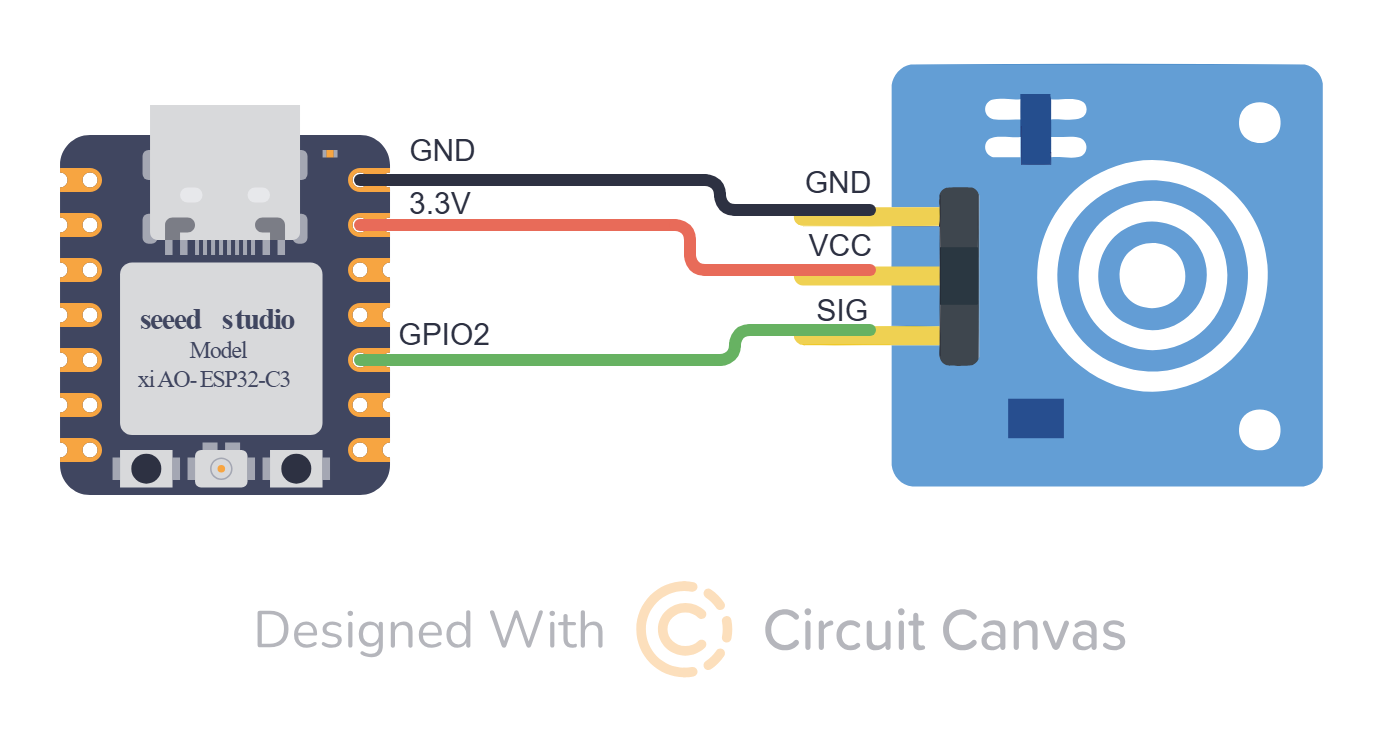
GPIO 4 conectado ao IN do relé. Diodo 1N4007 em paralelo com a bobina do relé para proteção.
Código Completo
1#include <Espalexa.h>
2#include <WiFi.h>
3#include <ESPmDNS.h>
4#include <ArduinoJson.h>
5
6#define WIFI_SSID     "SUA_REDE_WIFI"
7#define WIFI_PASSWORD "SUA_SENHA"
8#define AUTH_TOKEN "seu-token-unico-aqui"
9#define EXTERNAL_PORT 8081
10
11#define PIN_INTERRUPTOR 4   // Pino do interruptor inteligente
12
13Espalexa espalexa;
14WebServer server(8080);
15
16bool estadoInterruptor = false;
17
18void controleInterruptor(uint8_t state) {
19  estadoInterruptor = state;
20  digitalWrite(PIN_INTERRUPTOR, state ? LOW : HIGH);
21  Serial.print("Interruptor: ");
22  Serial.println(state ? "Ligado" : "Desligado");
23}
24
25void setupWiFi() {
26  Serial.print("Conectando ao WiFi...");
27  WiFi.begin(WIFI_SSID, WIFI_PASSWORD);
28  while (WiFi.status() != WL_CONNECTED) {
29    Serial.print(".");
30    delay(1000);
31  }
32  Serial.println(" Conectado!");
33}
34
35bool isAuthorized() {
36  if (!server.hasHeader("Authorization")) {
37    return false;
38  }
39  String token = server.header("Authorization");
40  return token == "Bearer " AUTH_TOKEN;
41}
42
43void handleDevices() {
44  if (!isAuthorized()) {
45    server.send(401, "application/json", "{"error":"Unauthorized"}");
46    return;
47  }
48
49  StaticJsonDocument<512> json;
50  json["external_port"] = EXTERNAL_PORT;
51  JsonArray devices = json.createNestedArray("devices");
52
53  JsonObject interruptor = devices.createNestedObject();
54  interruptor["name"] = "Interruptor Inteligente";
55  interruptor["type"] = "switch";
56  interruptor["icon"] = "toggle-left";
57
58  JsonObject props = interruptor.createNestedObject("props");
59  props["state"] = estadoInterruptor ? "on" : "off";
60
61  JsonObject routes = interruptor.createNestedObject("routes");
62  routes["state"] = "/state/interruptor";
63
64  JsonArray actions = interruptor.createNestedArray("actions");
65  JsonObject action = actions.createNestedObject();
66  action["key"] = "toggle_state";
67  action["route"] = "/control/interruptor";
68  action["type"] = "switch";
69
70  String response;
71  serializeJson(json, response);
72  server.send(200, "application/json", response);
73}
74
75void handleControlInterruptor() {
76  if (!isAuthorized()) {
77    server.send(401, "application/json", "{"error":"Unauthorized"}");
78    return;
79  }
80
81  // Pulso momentâneo para acionar o interruptor
82  estadoInterruptor = !estadoInterruptor;
83  digitalWrite(PIN_INTERRUPTOR, estadoInterruptor ? LOW : HIGH);
84  delay(500);  // Pulso de 500ms
85  digitalWrite(PIN_INTERRUPTOR, estadoInterruptor ? HIGH : LOW);
86
87  server.send(200, "application/json", "{"status":"success"}");
88}
89
90void handleStateInterruptor() {
91  if (!isAuthorized()) {
92    server.send(401, "application/json", "{"error":"Unauthorized"}");
93    return;
94  }
95  server.send(200, "application/json",
96    estadoInterruptor ? "{"state":"on"}" : "{"state":"off"}");
97}
98
99void setup() {
100  Serial.begin(115200);
101  pinMode(PIN_INTERRUPTOR, OUTPUT);
102  digitalWrite(PIN_INTERRUPTOR, HIGH);
103
104  setupWiFi();
105
106  server.on("/devices", handleDevices);
107  server.on("/control/interruptor", handleControlInterruptor);
108  server.on("/state/interruptor", handleStateInterruptor);
109  server.begin();
110
111  espalexa.addDevice("Interruptor Inteligente", controleInterruptor);
112  espalexa.begin();
113
114  MDNS.begin("esp32-interruptor");
115  MDNS.addService("http", "tcp", 80);
116}
117
118void loop() {
119  espalexa.loop();
120  server.handleClient();
121}Alimentador automático com controle de quantidade via servo motor
Aplicações
- Alimentador automático para pets
- Dispensador de ração programável
- Controle de porções personalizadas
Componentes Necessários
- ESP32-WROOM-32D ou semelhante
- Motor DC com caixa de redução (5V ou 6V)
- Módulo Relé 5V (1 canal)
- Sensor Touch Capacitivo TTP223
Diagrama de Circuito
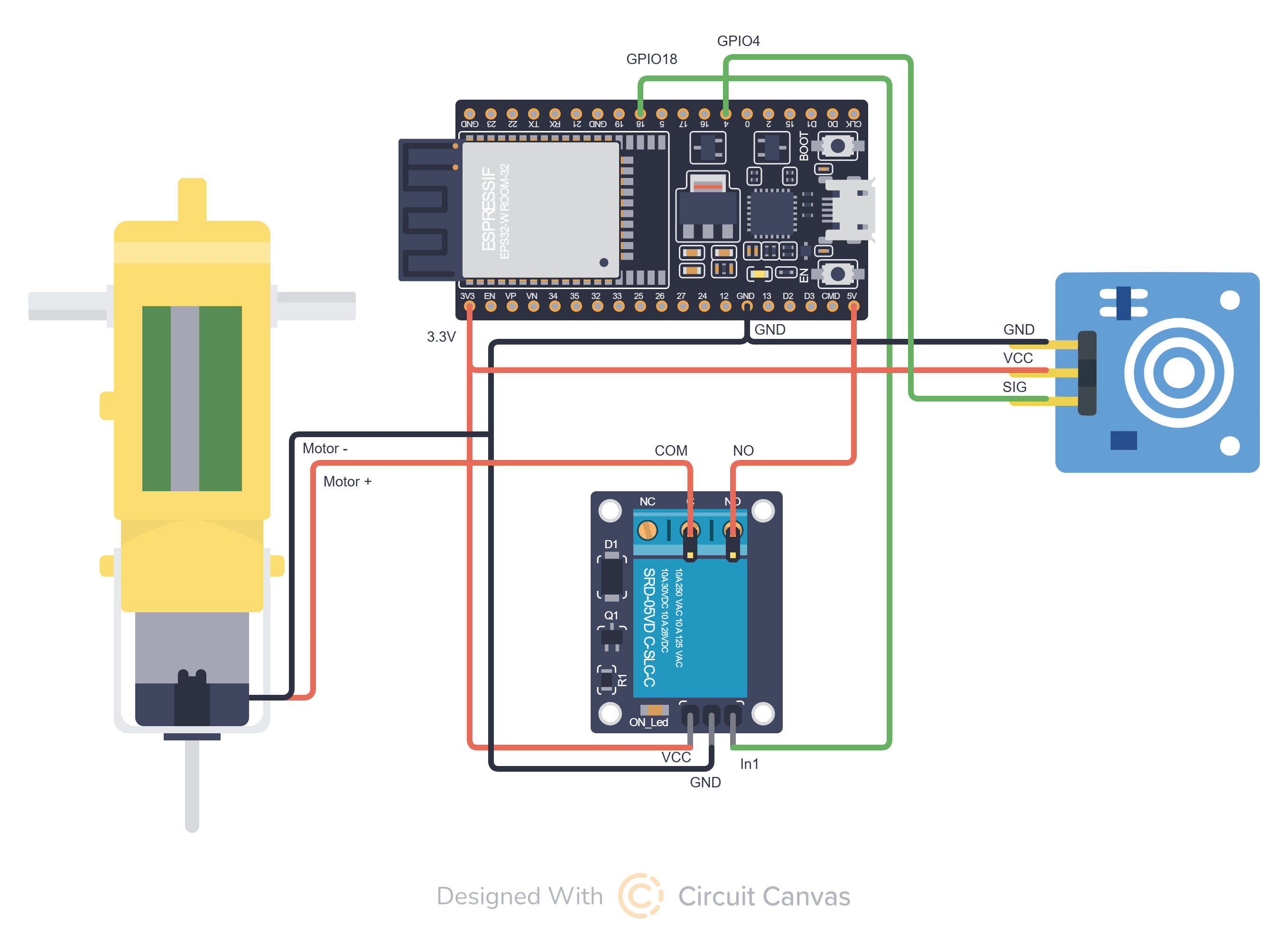
GPIO 15 conectado ao sinal do servo. VCC do servo em 5V com capacitor 100µF para estabilização.
Código Completo
1#include <WebServer.h>
2#include <WiFi.h>
3#include <WiFiClient.h>
4#include <Preferences.h>
5#include <ESPmDNS.h>
6#include <NimBLEDevice.h>
7#include <ArduinoJson.h>
8#include <AESLib.h>
9#include <base64.h>
10#include <PubSubClient.h>
11#include <esp_system.h>
12
13// ==================== CONFIGURAÇÕES ====================
14
15// UUIDs BLE
16#define SERVICE_UUID        "12345678-1234-5678-1234-56789abcdef0"
17#define CHARACTERISTIC_UUID "abcdef01-1234-5678-1234-56789abcdef0"
18#define DEVICE_ID_CHAR_UUID "abcdef02-1234-5678-1234-56789abcdef0"
19
20// Identificação do dispositivo
21#define TYPE "BARREL_FEEDER"
22
23// Pinos
24#define MAIN_PIN 18
25#define TOUCH_PIN 4
26
27// MQTT
28const char* mqtt_server = "barrel.app.br";
29const int mqtt_port = 1883;
30
31// Criptografia AES
32String aesKeyString = "<AES_KEY>";
33String aesIVString = "<AES_IV>";
34
35// ==================== VARIÁVEIS GLOBAIS ====================
36
37WiFiClient espClient;
38PubSubClient mqttClient(espClient);
39Preferences preferences;
40WebServer server(8080);
41
42NimBLECharacteristic *pCharacteristic;
43NimBLECharacteristic *pDeviceIdChar;
44
45String receivedData = "";
46bool bleEnabled = false;
47bool isOn = false;
48bool mqttEnabled = false;
49
50// Controle do sensor touch
51unsigned long lastTouchTime = 0;
52bool lastTouchState = HIGH;
53
54// ==================== FUNÇÕES DE ID DO DISPOSITIVO ====================
55
56String toHex(uint64_t v, uint8_t bytes) {
57  char buf[17] = {0};
58  for (int i = bytes - 1; i >= 0; --i) {
59    uint8_t b = (v >> (i * 8)) & 0xFF;
60    sprintf(buf + (bytes - 1 - i) * 2, "%02X", b);
61  }
62  return String(buf);
63}
64
65String getDeviceIdFull() {
66  uint64_t mac = ESP.getEfuseMac();
67  return toHex(mac, 6);
68}
69
70String getDeviceIdShort() {
71  uint64_t mac = ESP.getEfuseMac();
72  String prefix = toHex(mac >> 32, 2);
73  String suffix = toHex(mac, 2);
74  return prefix + suffix;
75}
76
77// ==================== FUNÇÕES DE CRIPTOGRAFIA ====================
78
79void stringToBytes(String hexString, byte* byteArray) {
80  for (int i = 0; i < hexString.length(); i += 2) {
81    String byteString = hexString.substring(i, i + 2);
82    byteArray[i / 2] = strtol(byteString.c_str(), NULL, 16);
83  }
84}
85
86String decryptMessage(String encryptedMessage) {
87  byte decrypted[128];
88  byte encrypted[128];
89  byte aesKey[16];
90  byte aesIV[16];
91
92  stringToBytes(aesKeyString, aesKey);
93  stringToBytes(aesIVString, aesIV);
94
95  int encryptedLen = base64_dec_len(encryptedMessage.c_str(), encryptedMessage.length());
96  int actualEncryptedLen = base64_decode((char*)encrypted, encryptedMessage.c_str(), encryptedMessage.length());
97
98  AES aes;
99  int decryptedLen = aes.do_aes_decrypt(encrypted, actualEncryptedLen, decrypted, aesKey, 128, aesIV);
100
101  // Remove padding PKCS7
102  if (decryptedLen > 0) {
103    uint8_t padLength = decrypted[decryptedLen - 1];
104    if (padLength > 0 && padLength <= 16) {
105      decryptedLen -= padLength;
106    }
107  }
108
109  String decryptedMessage = "";
110  for (int i = 0; i < decryptedLen; i++) {
111    decryptedMessage += (char)decrypted[i];
112  }
113
114  return decryptedMessage;
115}
116
117// ==================== CONTROLE DO ALIMENTADOR ====================
118
119// Pulso de 2 segundos para liberar ração
120void setPin() {
121  digitalWrite(MAIN_PIN, HIGH);
122  isOn = true;
123  publishDeviceState();
124  delay(2000);
125
126  digitalWrite(MAIN_PIN, LOW);
127  isOn = false;
128  publishDeviceState();
129}
130
131// ==================== FUNÇÕES MQTT ====================
132
133void publishDeviceState() {
134  if (!mqttEnabled || !mqttClient.connected()) {
135    return;
136  }
137
138  if (WiFi.status() == WL_CONNECTED) {
139    String ip = WiFi.localIP().toString();
140    String state = isOn ? "on" : "off";
141
142    preferences.begin("wifi-config", false);
143    String mqtt_user = preferences.getString("mqtt_user", "");
144    preferences.end();
145
146    String shortId = getDeviceIdShort();
147    String topic = "users/" + mqtt_user + "/" + String(TYPE) + "_" + shortId + "/status";
148    String payload = state + "," + ip;
149
150    if (mqttClient.publish(topic.c_str(), payload.c_str())) {
151      Serial.println("Estado publicado no MQTT(" + topic + "): " + payload);
152    } else {
153      Serial.println("Falha ao publicar estado no MQTT.");
154    }
155  }
156}
157
158void mqttCallback(char* topic, byte* payload, unsigned int length) {
159  Serial.print("Mensagem recebida [");
160  Serial.print(topic);
161  Serial.print("]: ");
162
163  String cmd;
164  for (unsigned int i = 0; i < length; i++) {
165    cmd += (char)payload[i];
166  }
167  handleCommand(cmd);
168}
169
170bool connectToMQTT() {
171  preferences.begin("wifi-config", false);
172  String mqtt_user = preferences.getString("mqtt_user", "");
173  String mqtt_password = preferences.getString("mqtt_pass", "");
174  preferences.end();
175
176  // Valida se tem credenciais MQTT
177  if (mqtt_user.length() == 0 || mqtt_password.length() == 0) {
178    Serial.println("Credenciais MQTT não configuradas. MQTT desabilitado.");
179    mqttEnabled = false;
180    return false;
181  }
182
183  mqttClient.setServer(mqtt_server, mqtt_port);
184  mqttClient.setCallback(mqttCallback);
185
186  String clientId = "ESP32Client-" + String(WiFi.macAddress());
187  String shortId = getDeviceIdShort();
188  String mqtt_topic = "users/" + mqtt_user + "/" + String(TYPE) + "_" + shortId + "/command";
189
190  if (mqttClient.connect(clientId.c_str(), mqtt_user.c_str(), mqtt_password.c_str())) {
191    Serial.println("Conectado ao broker MQTT!");
192    mqttClient.subscribe(mqtt_topic.c_str());
193    mqttEnabled = true;
194    return true;
195  } else {
196    Serial.println("Falha na conexão MQTT. Código: " + String(mqttClient.state()));
197    mqttEnabled = false;
198    return false;
199  }
200}
201
202void reconnectMQTT() {
203  if (!mqttEnabled) {
204    return; // Não tenta reconectar se MQTT está desabilitado
205  }
206
207  preferences.begin("wifi-config", false);
208  String mqtt_user = preferences.getString("mqtt_user", "");
209  String mqtt_password = preferences.getString("mqtt_pass", "");
210  preferences.end();
211
212  // Valida credenciais novamente
213  if (mqtt_user.length() == 0 || mqtt_password.length() == 0) {
214    Serial.println("Credenciais MQTT ausentes. Desabilitando MQTT.");
215    mqttEnabled = false;
216    return;
217  }
218
219  while (!mqttClient.connected() && mqttEnabled) {
220    String clientId = "ESP32Client-" + String(WiFi.macAddress());
221    Serial.println("Reconectando ao MQTT...");
222
223    String shortId = getDeviceIdShort();
224    String mqtt_topic = "users/" + mqtt_user + "/" + String(TYPE) + "_" + shortId + "/command";
225
226    if (mqttClient.connect(clientId.c_str(), mqtt_user.c_str(), mqtt_password.c_str())) {
227      mqttClient.subscribe(mqtt_topic.c_str());
228      Serial.println("Reconectado ao MQTT!");
229    } else {
230      Serial.println("Falha ao reconectar. Tentando novamente em 5s...");
231      delay(5000);
232    }
233  }
234}
235
236// ==================== BLUETOOTH (BLE) ====================
237
238class MyCallbacks : public NimBLECharacteristicCallbacks {
239  void onWrite(NimBLECharacteristic* pCharacteristic) override {
240    std::string value = pCharacteristic->getValue();
241    if (value.length() > 0) {
242      receivedData = String(value.c_str());
243      Serial.println("Received via BLE: " + receivedData);
244
245      // Parse credenciais (formato: SSID,PASSWORD,USERMQTT,PASSMQTT)
246      int firstComma = receivedData.indexOf(",");
247      int secondComma = receivedData.indexOf(",", firstComma + 1);
248      int thirdComma = receivedData.indexOf(",", secondComma + 1);
249
250      if (firstComma > 0) {
251        preferences.begin("wifi-config", false);
252        String ssid = receivedData.substring(0, firstComma);
253        String password = receivedData.substring(firstComma + 1, secondComma);
254
255        // MQTT é opcional
256        String mqttUser = "";
257        String mqttPass = "";
258
259        if (secondComma > 0 && thirdComma > secondComma) {
260          mqttUser = receivedData.substring(secondComma + 1, thirdComma);
261          mqttPass = receivedData.substring(thirdComma + 1);
262
263          if (mqttUser.length() > 0 && mqttPass.length() > 0) {
264            preferences.putString("mqtt_user", mqttUser);
265            preferences.putString("mqtt_pass", mqttPass);
266            Serial.println("Credenciais MQTT salvas.");
267          }
268        }
269
270        Serial.println("Connecting to WiFi...");
271        WiFi.begin(ssid.c_str(), password.c_str());
272
273        int tries = 0;
274        while (WiFi.status() != WL_CONNECTED && tries < 10) {
275          delay(1000);
276          Serial.print(".");
277          tries++;
278        }
279
280        if (WiFi.status() == WL_CONNECTED) {
281          Serial.println("
282Connected to WiFi!");
283          preferences.putString("ssid", ssid);
284          preferences.putString("password", password);
285          pCharacteristic->setValue("Connected");
286        } else {
287          Serial.println("
288Failed to connect.");
289          pCharacteristic->setValue("Failed");
290          preferences.clear();
291        }
292
293        preferences.end();
294        delay(3000);
295        ESP.restart();
296      }
297    }
298  }
299};
300
301void enableBLE() {
302  if (!bleEnabled) {
303    Serial.println("Enabling BLE...");
304
305    String shortId = getDeviceIdShort();
306    String fullId = getDeviceIdFull();
307    String bleName = String(TYPE) + "_" + shortId;
308
309    NimBLEDevice::init(bleName.c_str());
310
311    NimBLEServer* pServer = NimBLEDevice::createServer();
312    NimBLEService* pService = pServer->createService(SERVICE_UUID);
313
314    pCharacteristic = pService->createCharacteristic(
315      CHARACTERISTIC_UUID,
316      NIMBLE_PROPERTY::READ | NIMBLE_PROPERTY::WRITE | NIMBLE_PROPERTY::READ_ENC | NIMBLE_PROPERTY::WRITE_ENC
317    );
318    pCharacteristic->setCallbacks(new MyCallbacks());
319
320    pDeviceIdChar = pService->createCharacteristic(
321      DEVICE_ID_CHAR_UUID,
322      NIMBLE_PROPERTY::READ
323    );
324    pDeviceIdChar->setValue(fullId.c_str());
325
326    pService->start();
327
328    NimBLEAdvertising* pAdvertising = NimBLEDevice::getAdvertising();
329    pAdvertising->addServiceUUID(SERVICE_UUID);
330    pAdvertising->setScanResponse(true);
331
332    std::string mdata = "AID:" + std::string(fullId.c_str());
333    pAdvertising->setManufacturerData(mdata);
334    pAdvertising->start();
335
336    NimBLEDevice::startAdvertising();
337    bleEnabled = true;
338  }
339}
340
341void disableBLE() {
342  if (bleEnabled) {
343    Serial.println("Disabling BLE...");
344    NimBLEDevice::deinit(true);
345    bleEnabled = false;
346  }
347}
348
349// ==================== COMANDOS ========================
350void handleCommand(String cmd) {
351    if (cmd.equalsIgnoreCase("release")) {
352      setPin();
353    }
354    else if (cmd.equalsIgnoreCase("status")) {
355      publishDeviceState();
356    }
357    else if (cmd.equalsIgnoreCase("clear")) {
358      preferences.begin("wifi-config", false);
359      preferences.clear();
360      preferences.end();
361      server.send(200, "text/plain", "OK");
362      Serial.println("Reiniciando...");
363      delay(500);
364      ESP.restart();
365    }
366}
367
368// ==================== SERVIDOR WEB ====================
369
370void handleState() {
371  if (server.hasArg("plain")) {
372    String encryptedBody = server.arg("plain");
373    String cmd = decryptMessage(encryptedBody);
374    Serial.println("Corpo descriptografado: " + cmd);
375
376    // Processa comandos HTTP
377    handleCommand(cmd);
378
379    server.send(200, "application/json", "{"message": "Comando recebido com sucesso!"}");
380  } else {
381    server.send(400, "application/json", "{"message": "Erro: Nenhum comando enviado!"}");
382  }
383}
384
385// ==================== SETUP ====================
386
387void setup() {
388  Serial.begin(115200);
389
390  String shortId = getDeviceIdShort();
391  String deviceId = String(TYPE) + "_" + shortId;
392  Serial.print("Iniciando " + deviceId);
393
394  pinMode(MAIN_PIN, OUTPUT);
395  pinMode(TOUCH_PIN, INPUT_PULLUP);
396
397  preferences.begin("wifi-config", false);
398  String ssid = preferences.getString("ssid", "");
399  String password = preferences.getString("password", "");
400  Serial.print(ssid.c_str());
401  preferences.end();
402
403  // Se tem credenciais salvas, conecta ao WiFi
404  if (ssid.length() > 0) {
405    WiFi.begin(ssid.c_str(), password.c_str());
406
407    Serial.print("Conectando ao Wi-Fi");
408    int attempts = 0;
409    while (WiFi.status() != WL_CONNECTED && attempts < 20) {
410      delay(1000);
411      Serial.print(".");
412      attempts++;
413    }
414
415    if (WiFi.status() == WL_CONNECTED) {
416      Serial.println("
417Wi-Fi Conectado!");
418      Serial.print("IP: ");
419      Serial.println(WiFi.localIP());
420
421      // Iniciar mDNS
422      if (!MDNS.begin(deviceId)) {
423        Serial.println("Erro ao iniciar mDNS");
424      } else {
425        Serial.println("mDNS iniciado: barrel.local");
426      }
427
428      disableBLE();
429
430      // Rotas do servidor web
431      server.on("/get_key_iv", HTTP_GET, []() {
432        preferences.begin("wifi-config", false);
433        bool keyIvAccessed = preferences.getBool("key_accessed", false);
434
435        if (!keyIvAccessed) {
436          String response = aesKeyString + ":" + aesIVString;
437          server.send(200, "text/plain", response);
438          preferences.putBool("key_accessed", true);
439          Serial.println("Chave/IV enviados. Rota bloqueada permanentemente.");
440        } else {
441          server.send(403, "text/plain", "Acesso negado. Rota já foi acessada.");
442          Serial.println("Tentativa de acesso à rota get_key_iv bloqueada.");
443        }
444
445        preferences.end();
446      });
447
448      server.on("/clear", HTTP_GET, []() {
449        preferences.begin("wifi-config", false);
450        preferences.clear();
451        preferences.end();
452        server.send(200, "text/plain", "OK");
453        Serial.println("Reiniciando...");
454        delay(500);
455        ESP.restart();
456      });
457
458      server.on("/command", HTTP_POST, handleState);
459
460      server.begin();
461
462      // Tenta conectar ao MQTT apenas se tiver credenciais
463      connectToMQTT();
464    }
465  }
466  else {
467    // Sem credenciais, ativa BLE para configuração
468    enableBLE();
469  }
470}
471
472// ==================== LOOP ====================
473
474void loop() {
475  server.handleClient();
476
477  if (!bleEnabled && mqttEnabled) {
478    if (!mqttClient.connected()) {
479      reconnectMQTT();
480    }
481    mqttClient.loop();
482  }
483
484  // Monitorar sensor touch com debounce
485  bool touchState = digitalRead(TOUCH_PIN);
486
487  if (lastTouchState == HIGH && touchState == LOW) {
488    unsigned long now = millis();
489    if (now - lastTouchTime > 500) {
490      setPin();
491      Serial.println("Touch detectado");
492      lastTouchTime = now;
493    }
494  }
495
496  lastTouchState = touchState;
497}
Pronto para Começar?
Baixe o Arduino IDE, instale as bibliotecas necessárias e comece a criar seus próprios dispositivos inteligentes integrados ao Barrel Smart Home.